After a CI run with 30 failing tests, someone has to figure out which are product bugs, which are automation issues, and which are flaky. Done by hand, that triage can take an hour or two per CI cycle and needs someone who knows both the product and the automation framework. The triaging agent does it in minutes, with a built-in adversarial review: a second, independent Claude pass that challenges every classification.
The Problem
CI runs fail. That's expected. What isn't expected is how long it takes to understand why they failed, and what to do about each one.
A typical post-CI triage session looks like: open the HTML report, click into each failure one by one, read the stack trace, check the error message, decide if this is a real product regression or a stale locator, check if this test has been flaky recently, write a summary for the dev team, and try to remember which failures you already looked at. Multiplied by 30 failing tests, that's a morning gone.
The triaging agent replaces this manual process. It runs a 5-step pipeline that scouts unanalysed builds, collects failure data with flakiness history, classifies each failure with Claude, submits that classification to an independent adversarial review, and ships a full HTML report to Slack, all without human involvement.
The 5-Step Pipeline
01_scout.py queries MySQL for build tags that have failures not yet analysed. It scores each candidate by failure count × recency and picks the highest-priority unanalysed build. This step is lightweight: pure database queries, no AI. The agent only moves to the next step when it finds a build worth analysing.
02_collect.py pulls all test failures for the selected build. For each failure it:
- Fetches the complete stack trace and error message from MySQL
- Parses the HTML test report (BeautifulSoup) for screenshots and additional context
- Checks the recent runs (the last 10 by default): a test that failed in at least 5 of them is flagged, and its pass/fail pattern shows whether it is intermittent or consistently broken
- Computes failure trends: is this test getting worse over time?
- Copies each failure's DOM snapshot, trace and page baselines into the session, so the next step can diagnose from evidence rather than from the error text alone
First, a failure diagnosis reads the evidence on disk (DOM snapshot, trace, baselines) and decides why an element was missing: a stale or ambiguous locator, or something no locator edit can fix (wrong page, an earlier step failed, environment unreachable, not ready yet…). A HIGH-confidence diagnosis is authoritative.
03_classify.py then batches the remaining failures in groups of 10 and calls Claude for each batch. The prompt includes the test name, full stack trace, error message, flakiness data, and trend history. Claude classifies each failure as one of two types, or UNKNOWN when the evidence doesn't support either:
PRODUCT_BUG means the application behaviour changed: assertion on business logic failed, API returned unexpected status, UI element content changed. AUTOMATION_ISSUE means the test code is wrong: element not found (stale locator), timeout (timing issue), wrong selector, bad assertion logic.
It also assigns a confidence level:
And a root cause category: ELEMENT_NOT_FOUND, TIMEOUT, ASSERTION_FAILURE, ENVIRONMENT_ISSUE, CODE_ISSUE, OTHER, or the diagnosis verdict itself, such as LOCATOR_STALE or WRONG_PAGE.
This is the key quality gate. 04_review.py sends the classifier's output to a second, separate Claude call (no shared context with the classifier), acting as an independent reviewer. It uses the same model: the independence comes from the separate call, not a different model.
The reviewer challenges each classification it disagrees with and provides alternative reasoning. The classifier can rebut or concede. Up to 2 debate rounds by default (TRIAGING_MAX_REVIEW_ROUNDS). The outcome is written to a .verdict file: APPROVED, or NEEDS-HUMAN when the two passes can't settle it. When they disagree, that's a signal. Low-confidence disagreements are escalated to humans in the final report.
05_ship.py generates the HTML report (AI-Generated-Report_<build-tag>.html). An APPROVED review posts it to Slack (#qa-reports) and writes handoff JSON to agents/test-healing-agent/queue/ for failures that qualify for auto-healing. A NEEDS-HUMAN review escalates to the alert channel (#qa-critical) instead, and nothing is queued for healing.
Why a second pass?
A single model classifying CI failures will make confident mistakes. The error patterns are subtle: a test that fails because of a UI change can look like a product bug if you only read the assertion failure. Running an independent review pass with structured debate rounds catches these misclassifications before they reach the report. The disagreement itself is signal worth surfacing to engineers.
The Report
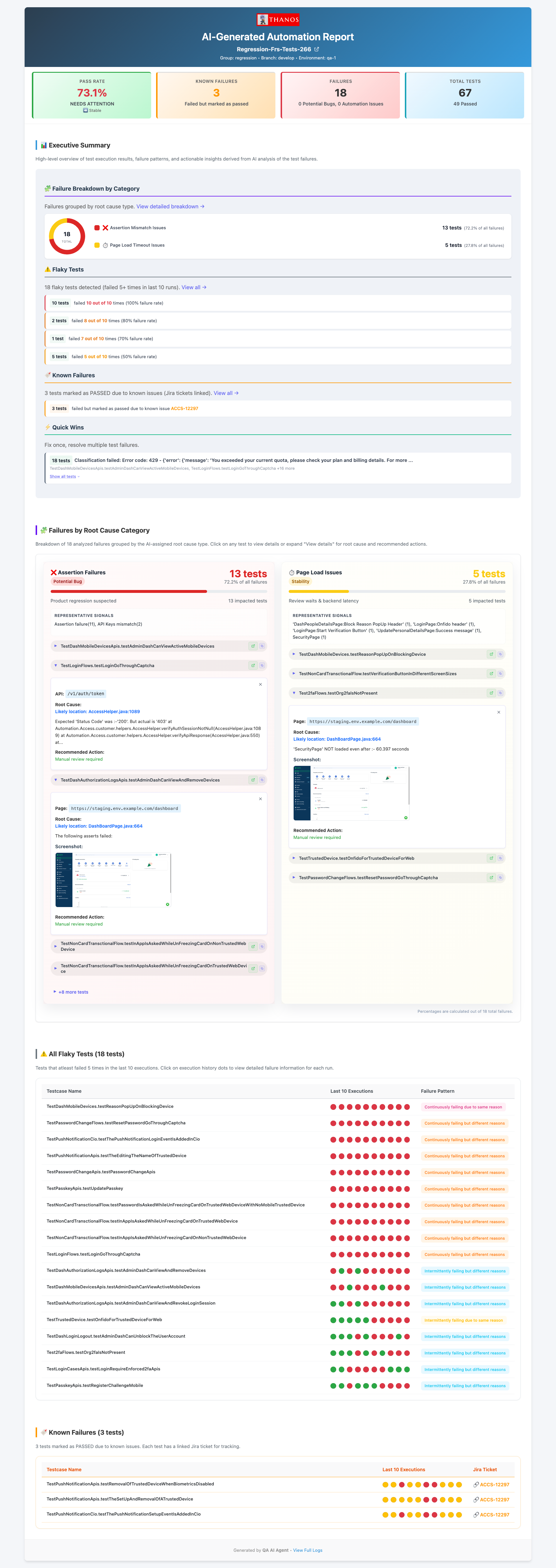
The HTML report is generated by 05_ship.py and includes every section an engineer needs to act on a CI run without looking at raw logs:
- Executive summary: overall pass rate, total failures, breakdown into automation issues vs product bugs. The top-line numbers a manager can read in 10 seconds.
- Failure breakdown by category: donut chart of root cause distribution across the whole build. Useful for spotting patterns: if 80% of failures are
ELEMENT_NOT_FOUND, there was probably a UI refresh. - Failures by root cause category: grouped failures with stack traces and AI reasoning for each classification. Engineers can see why the model made each call.
- Flaky test matrix: test name plus pass/fail pattern across the last 10 runs, visualised as coloured dots. Instant visibility into which tests can't be trusted.
- Known failures: tests tagged in the results with a known issue and its linked Jira ticket, listed separately so they aren't mistaken for new regressions.
What Qualifies for Auto-Healing
Only failures meeting all three criteria (from an APPROVED review) are handed to the healing agent. This conservative filter ensures the healing agent only attempts fixes where it has a high probability of success.
AMBIGUOUS_LOCATOR
ELEMENT_NOT_FOUND
A diagnosis stop verdict (wrong page, prior step failed, environment unreachable and the rest) never qualifies, whatever the classifier said: no locator edit can fix it. Failures that don't qualify still appear in the report; they just don't get auto-fixed. TIMEOUT and ASSERTION_FAILURE issues require human judgement about whether the timeout should be increased or the assertion logic revisited. PRODUCT_BUG failures are routed to the dev team with the full AI reasoning attached.
The handoff to healing
Qualifying failures are written to agents/test-healing-agent/queue/<build-tag>.json. This JSON file contains the failing test class name, method name, error message, and the AI classification reasoning. The healing agent reads this file and processes each failure in sequence, no human in the loop between triage and the first fix attempt.
Next: The Test Healing Agent
See how the agent takes the triaging output, confirms why each element was missing, fixes the stale locators, proves every fix with the real test, and raises a GitHub PR, autonomously.