Paste your requirements (or upload PDF or Word files, or point to Confluence pages), and the AI generates complete, structured test cases in about a minute. But the real trick is what happens before the first test case is written: the system cross-references your entire existing TestRail coverage and only generates tests for requirements that are not already covered.
Every QA team has the same problem: requirements keep coming, and writing test cases is slow. Not because it's difficult, but because it's repetitive, detail-heavy work that needs to be done consistently across every feature, every sprint, every release. And even when you write the tests, you're not always sure whether you've duplicated something that already exists in TestRail from six months ago.
The Test Design Agent solves both problems simultaneously. It generates the tests, and it knows what you already have.
How It Works
An engineer opens the AI Test Studio portal and opens Requirements → Tests. The interface offers three input modes, so you can work with requirements however they actually live in your organisation:
- Paste text: directly type or paste requirements into the text area. This is the fastest path for ad-hoc generation during a sprint planning session.
- Upload files: one or more
.txt,.pdf,.docxor.docfiles. The system extracts the requirement statements from the documents before passing them to the pipeline. You don't need to copy anything manually. - Confluence URLs: paste one or more Confluence page URLs. The system fetches the page content through the Confluence API and extracts the requirements from the body.
Crucially, the system doesn't immediately call an LLM. It first performs a RAG lookup against ChromaDB, the same vector store that holds all synced TestRail test cases and uploaded documents. This coverage analysis step identifies which requirements already have test cases written against them. A checkbox on the interface lets you choose to generate only for uncovered requirements, so you never duplicate what your team has already built.
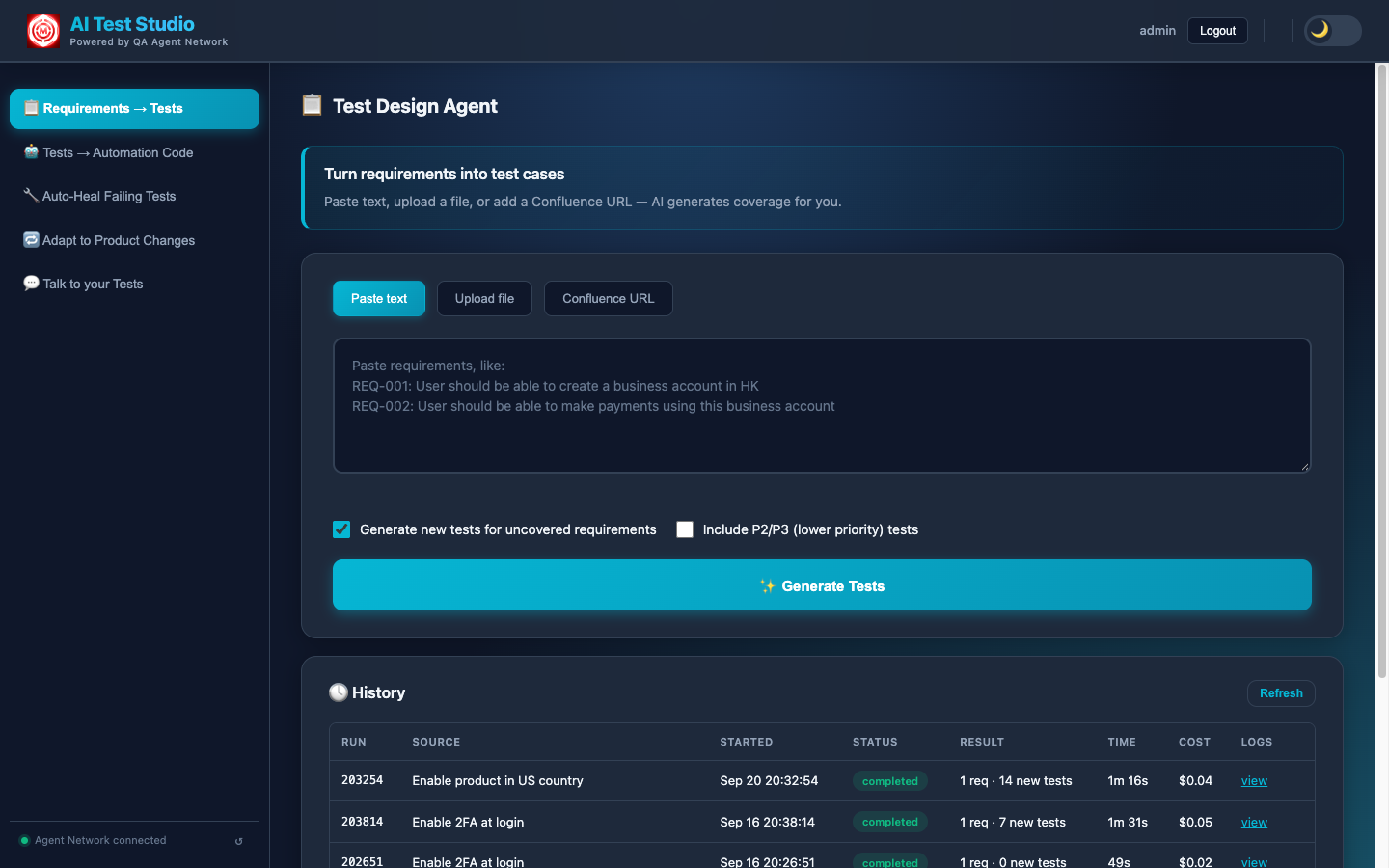
Requirements → Tests: three input modes, a checkbox to generate only for uncovered requirements, and a History of past runs with their result, time and cost.
The result is a coverage-aware generation pipeline. Not just "generate test cases from this text", but "generate test cases for the parts of this text that we haven't already tested."
What the AI Actually Does
Each run executes in the background as six phases (extract requirements, derive acceptance criteria, find related tests, check coverage, write missing tests, build end-to-end tests), streamed live to a Live Run card, so you watch the work happen rather than staring at a spinner. A run can be cancelled, survives a page refresh, and can be replayed later from History.
The LLM parses the input into discrete, atomic requirements. If a file was uploaded, it first extracts the requirement statements from the raw document content, pulling them out of prose, tables, bullet lists, or whatever structure the document uses. Each requirement is treated as an independent unit, which is what allows the system to track coverage at the individual-requirement level rather than the document level. Each one then gets explicit acceptance criteria (taken from the spec where it has them, derived where it doesn't), and the number of criteria sets the minimum number of tests the requirement needs.
Before writing a single new test, the system queries ChromaDB and returns the existing TestRail test cases that already cover your requirements, displayed directly in the UI. These aren't just signals to skip generation; they're actionable results. An engineer can see "we already have 4 tests for this login requirement" and confirm them as covered without writing anything new. You get the value of the existing test suite surfaced to you, requirement by requirement, without opening TestRail and searching manually.
Each requirement is scored by coverage depth. Requirements with strong semantic matches in TestRail are marked as already-covered. Requirements with partial matches are flagged as needing updates: the AI suggests exactly what to change in the existing case. Requirements with no matches are queued for generation. This three-way classification means you always know what exists, what needs updating, and what's genuinely missing.
For each uncovered requirement, the LLM generates a fully structured test case: test type (API, Functional, or End-to-End Flow), preconditions that must be true before execution, numbered steps with clear, unambiguous actions, expected results for each step, and a priority: P0–P1 by default, P2–P3 on request. Each requirement is processed individually so results appear progressively. A final phase builds end-to-end tests across the requirements, with the regression impact on the product areas they touch.
Results land in three tabs: Related Tests (existing cases), User Story Tests (new, per requirement) and E2E Tests.
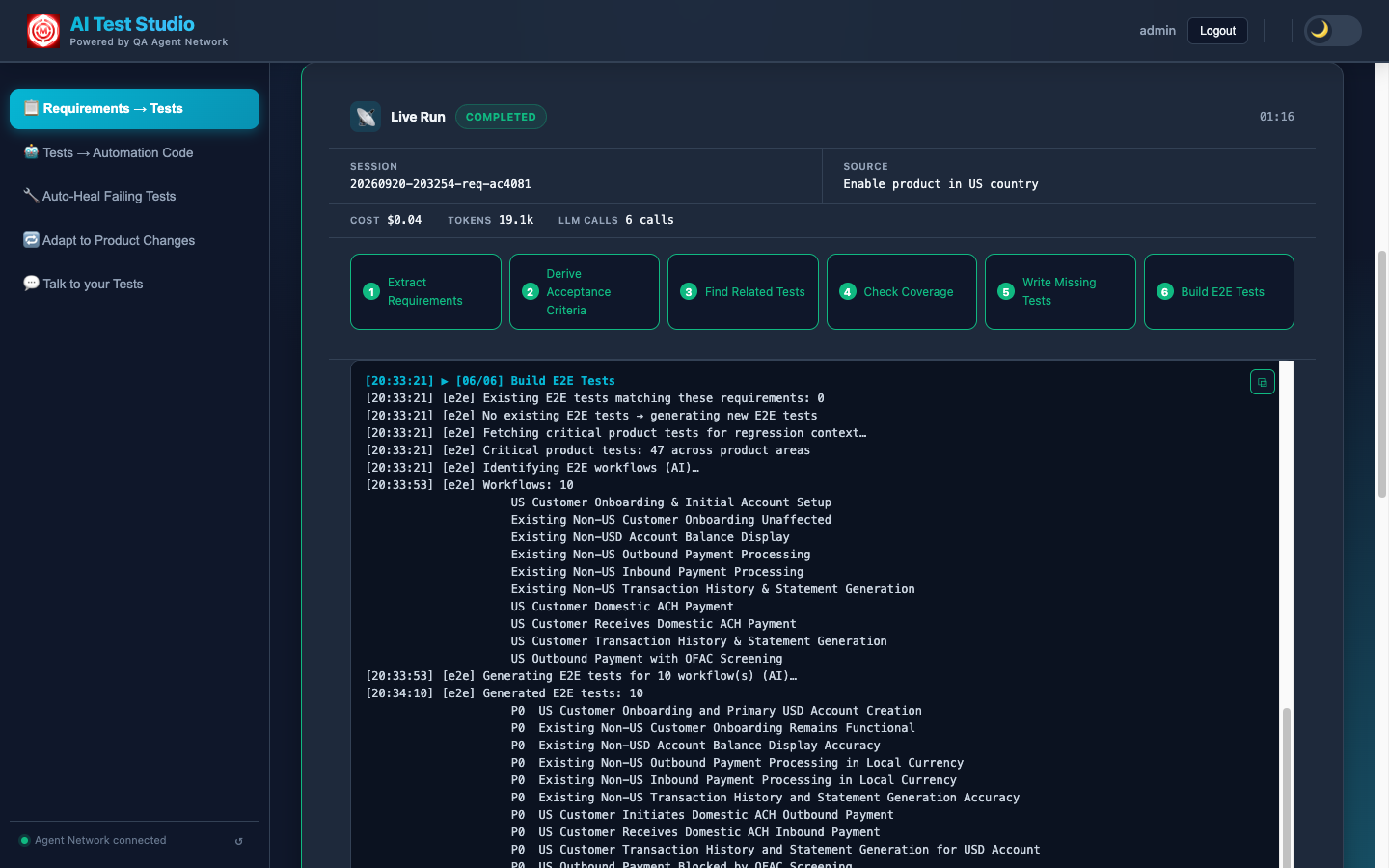
The Live Run card: six phases with live progress, plus the run's cost, tokens and LLM calls. The final phase identifies the end-to-end workflows the requirements touch and generates a test for each.
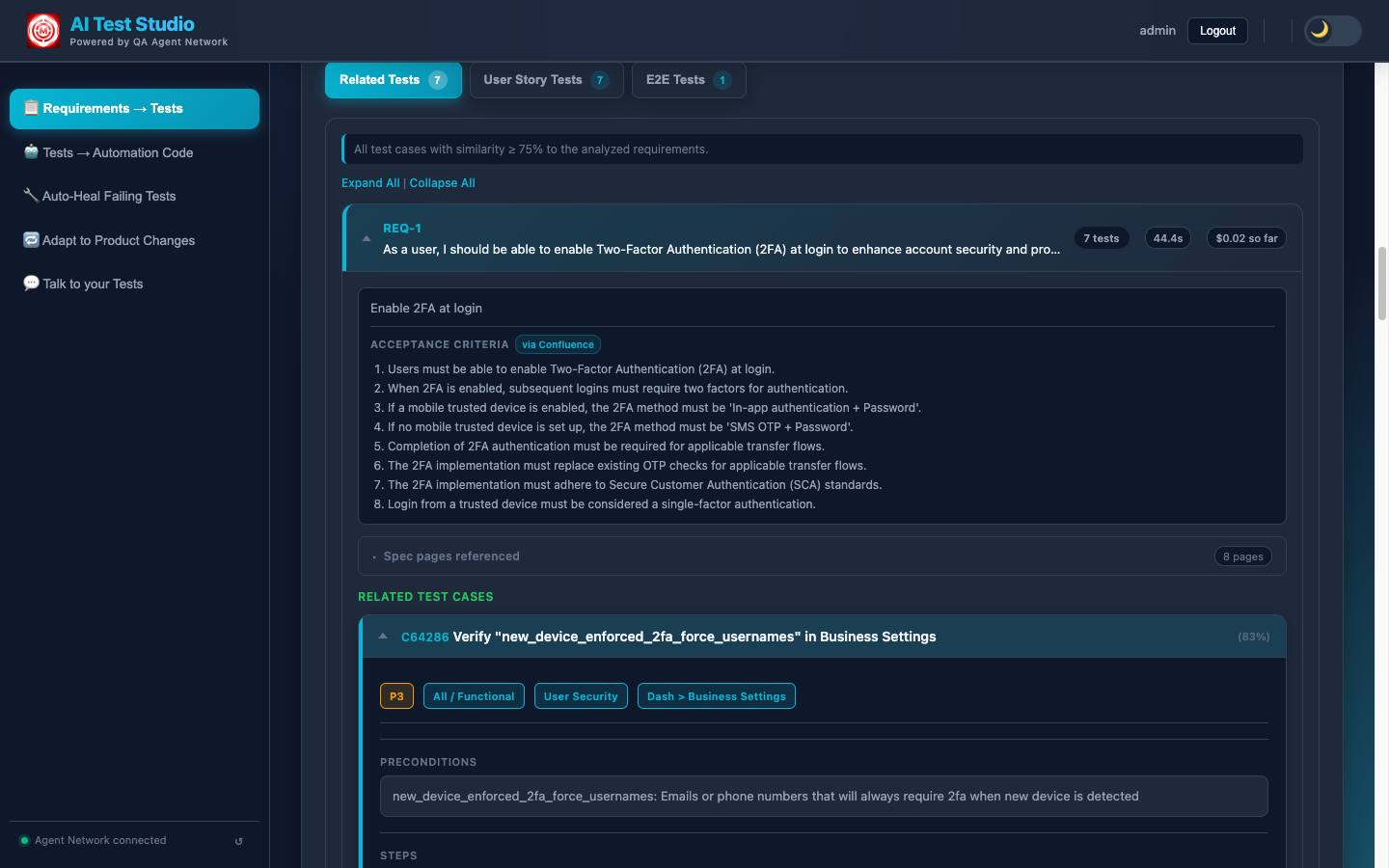
Related Tests: existing TestRail cases that already cover the requirement (those at or above the configured similarity threshold), shown beside its acceptance criteria and the Confluence spec pages it came from.
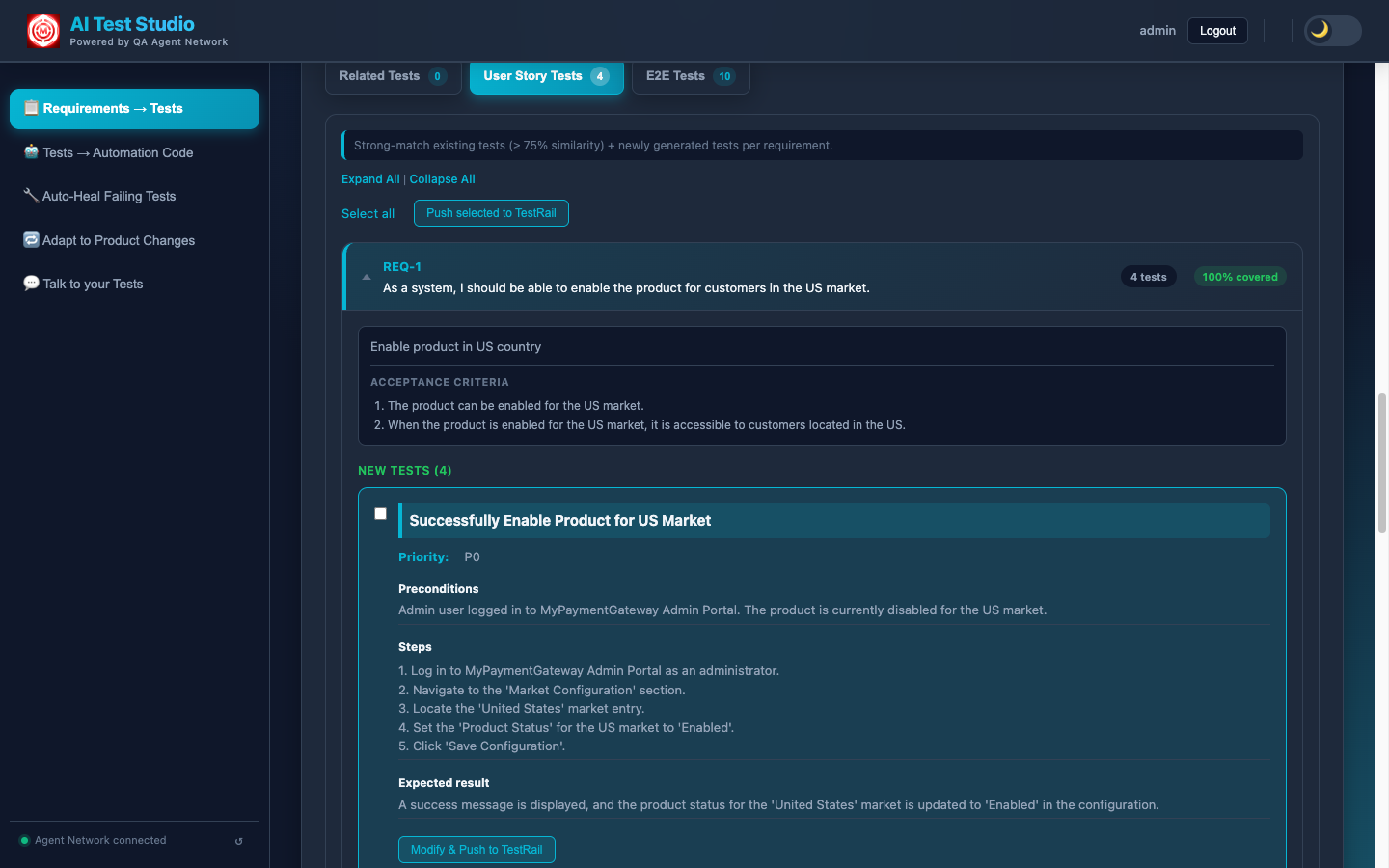
User Story Tests: newly generated cases with priority, preconditions, numbered steps and expected results, ready to push to TestRail individually or in bulk.
A typical requirement goes from Generate to fully formed tests in about a minute. For larger uploads, the Live Run keeps you informed as the pipeline works through each requirement in sequence.
The Knowledge Base Behind It
The quality of the coverage analysis depends entirely on what the admin has loaded into ChromaDB. The more complete the knowledge base, the better the system is at detecting what's already covered versus what's genuinely new. There are three sources:
The admin dashboard shows exactly how much has been ingested: number of documents, number of vector chunks, number of TestRail cases synced. This transparency is intentional: you can see exactly how deep the knowledge base is before you run a generation.
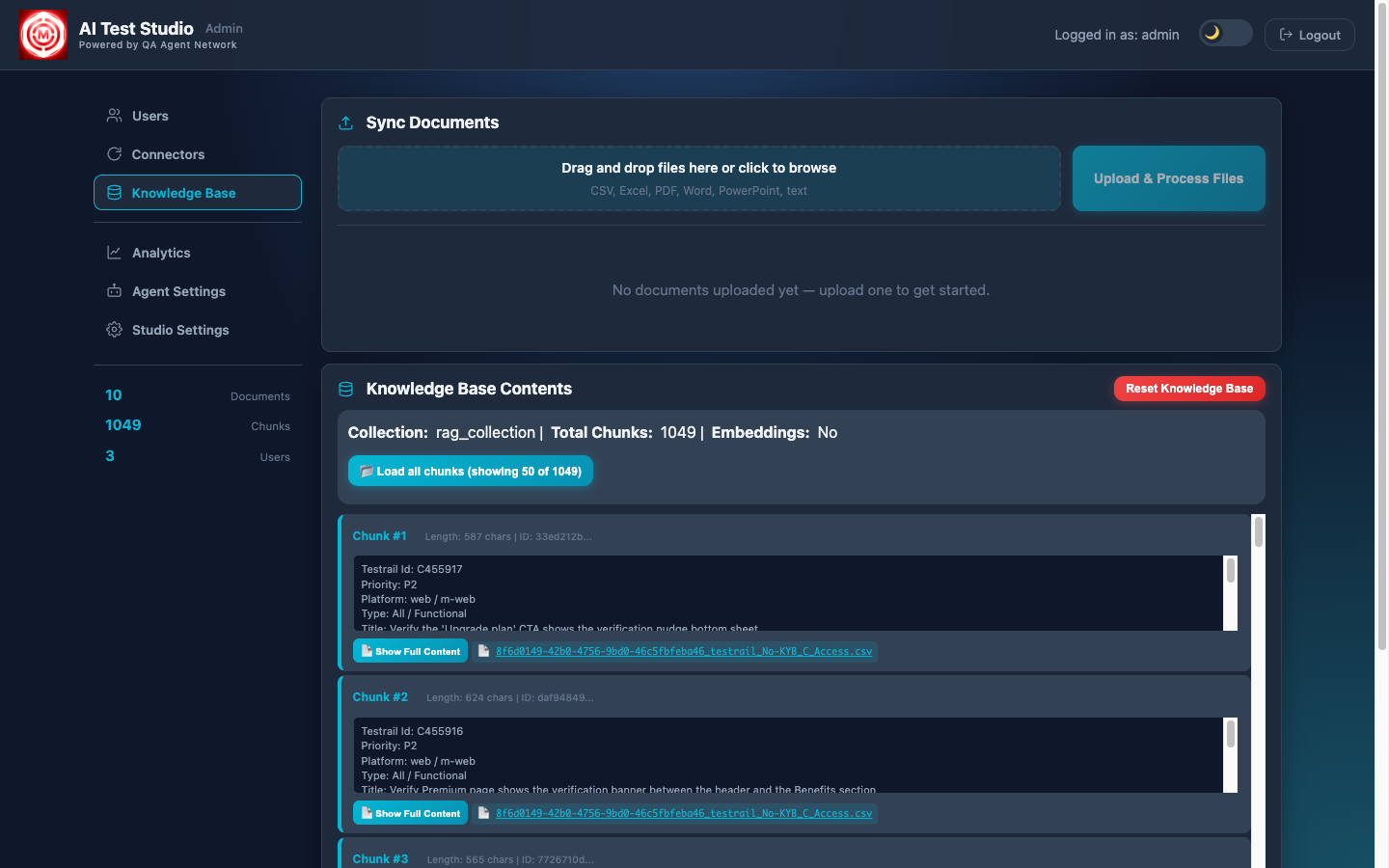
The admin portal's Knowledge Base: the chunks ingested into ChromaDB and their sources. This knowledge base is what powers the coverage gap detection and prevents duplicating existing tests.
The TestRail sync streams its progress in real time. You can watch each test case being pulled, chunked, and embedded into ChromaDB as the sync runs. After a full sync, the entire test suite becomes queryable by semantic similarity, not just keyword search.
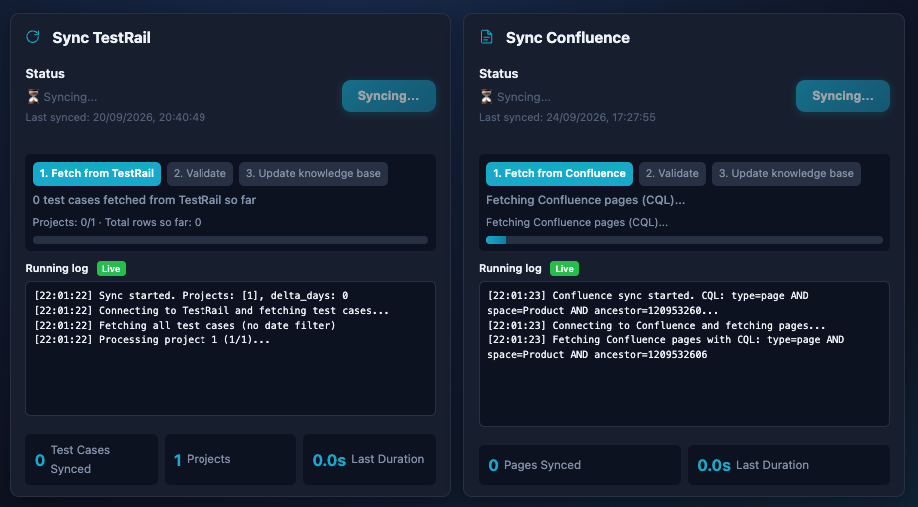
TestRail and Confluence syncs in progress, each with a live running log. Every test case and page is fetched, validated and embedded into ChromaDB, making the entire test suite queryable by the AI during generation.
Why semantic search matters for coverage detection
Keyword matching won't catch that "user cannot log in with expired credentials" and "authentication fails for lapsed account" are the same requirement phrased differently. Semantic embedding does. ChromaDB stores vector representations of every test case, so when a new requirement arrives, the system finds coverage matches based on meaning, not string similarity. This is what lets it catch duplicates that keyword search would miss, though a similarity threshold is still a judgement call, which is why matches are shown for an engineer to confirm.
Pushing to TestRail
After the AI generates test cases and you've reviewed them in the UI, a single click pushes them directly to TestRail via the API, and for an existing case that needs changing, Update with AI rewrites it in place. There's no copy-pasting, no manual entry, no reformatting. The system handles the entire submission:
- Project and suite mapping: each test case is pushed to the correct TestRail project and suite, configured by the admin at setup time.
- Structure preservation: preconditions, numbered steps, and expected results are preserved exactly as generated. TestRail receives them in the native field structure it expects, not as a blob of text.
- Recorded on the run: every push is recorded against the analysis run, so History shows exactly which generated cases went to TestRail. Pushing is switched on by an admin setting, so a new install can't write to TestRail by accident.
Because the system already cross-referenced existing coverage before generating, what it pushes to TestRail is aimed at real gaps. You're not cluttering your test suite with duplicates; you're filling actual gaps.
LLM Options
The system is multi-LLM and designed to be swapped without code changes. The active LLM is configured via a single environment variable. Three options are supported out of the box:
Swapping providers is one setting, in the admin portal's Studio Settings or in the environment file, plus an app restart. No prompts are hardcoded to any specific provider's response format, and no Python code needs to change. This makes it straightforward to run cost comparisons or move to a different provider as the landscape evolves.
What used to take 30–45 minutes now takes minutes
A senior QA engineer writing test cases manually for a set of 10 requirements (decomposing them, checking coverage, writing steps and expected results, entering them into TestRail) takes around 30–45 minutes on a good day. The Test Design Agent does the same work in about a minute per requirement, end-to-end tests included, with coverage awareness built in. That's not a marginal improvement. It changes what's feasible in a sprint.
Next: The Test Authoring Agent
Test generation creates the test plan. The Test Authoring Agent goes one step further: it writes the automation code, validates it against a real browser, fixes any compilation failures, and raises a GitHub PR. All from plain English.